
☕🤖Tutorial: How To Automate Claude Code With Scheduled Tasks (It Works While You Sleep)
PLUS: everything you need + all prompts inside...


Hey AI Breakers 👋
You’re still opening Claude Code every single time you need something done. What if it just... ran itself?
Today, you’ll build an AI Autopilot System using Claude Code’s scheduled tasks. Five automations that handle your recurring work on autopilot, whether your laptop is open or not.
✅ A morning briefing that summarizes your day before you sit down
✅ A competitor monitor that tracks rivals weekly and flags changes
✅ An automated PR reviewer that catches issues overnight
✅ A content calendar refresher that keeps your pipeline full
✅ A quick session poller for monitoring builds and deployments
Let’s build it 👇
🧠 How Claude Code Scheduling Works
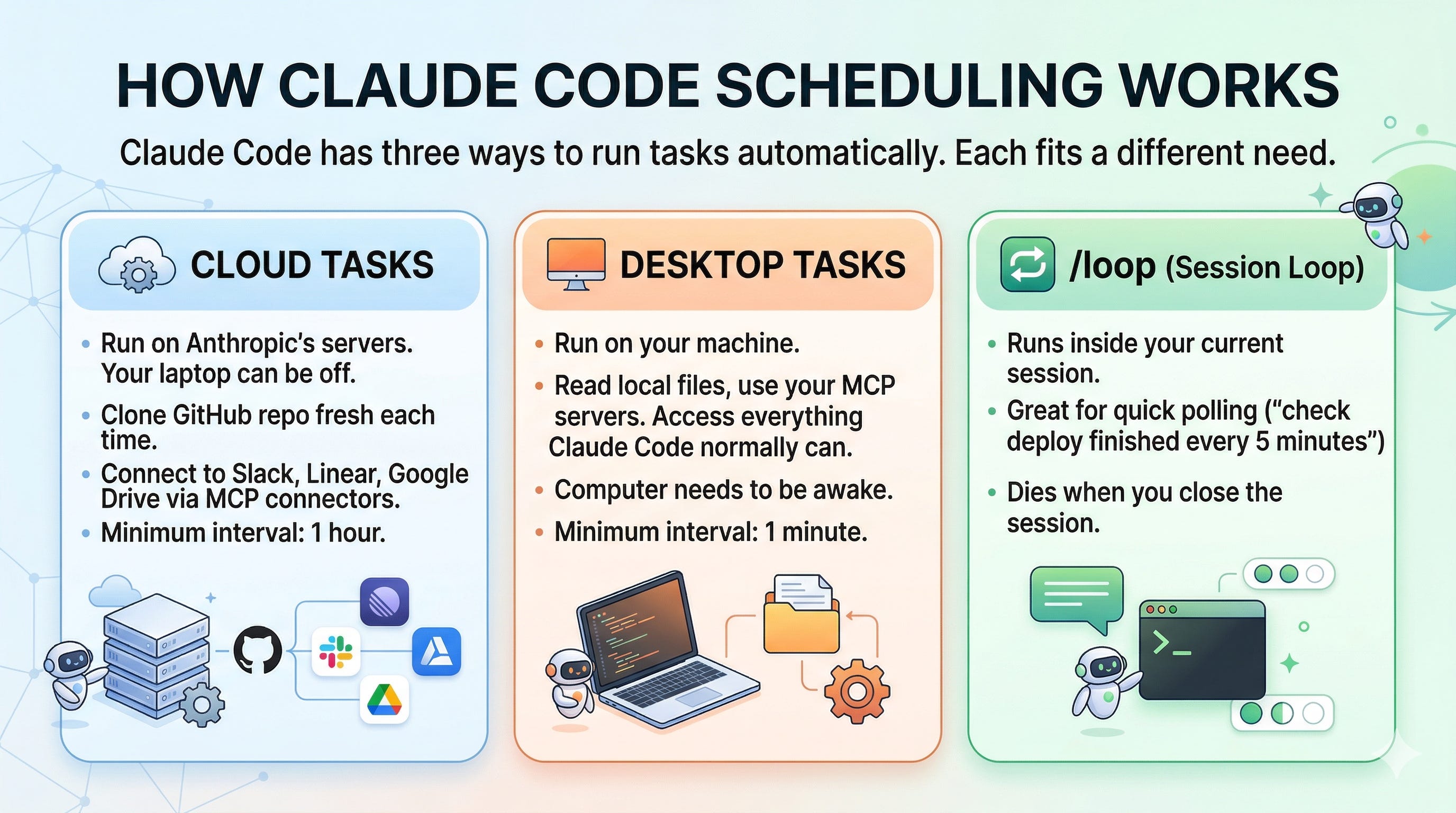
Claude Code has three ways to run tasks automatically. Each fits a different need.
☁️ Cloud Tasks run on Anthropic’s servers. Your laptop can be off. They clone your GitHub repo fresh each time and can connect to Slack, Linear, Google Drive via MCP connectors. Minimum interval: 1 hour.
🖥️ Desktop Tasks run on your machine. They can read your local files, use your MCP servers, and access everything Claude Code normally can. Your computer needs to be awake. Minimum interval: 1 minute.
🔁 /loop runs inside your current session. Great for quick polling (”check if the deploy finished every 5 minutes”). Dies when you close the session.
The old way: You remember to check things, open Claude Code, type the same prompt, and wait for results. Every. Single. Time.
The new way: Set it once. Claude handles it forever.
☁️ Prompt #1 → The Morning Briefing (Start Every Day Informed)
Most people open their inbox cold and spend 30 minutes figuring out what matters. This task does that for you before you sit down.
The goal:
Summarize unread emails by priority
Pull today’s calendar and flag prep needs
List open tasks and deadlines
Deliver everything to Slack or email by 8am
✅ Use this to start every workday with clarity instead of chaos
Setup: Open the Claude Code Desktop app → click Schedule in the sidebar → New task → New local task. Set frequency to Daily at 8:00 AM.
Prompt:
You are my executive assistant preparing a morning briefing.

1. Check my inbox for unread emails from the last 12 hours. Categorize them:
   - 🔴 Urgent (needs response today)
   - 🟡 Important (needs response this week)
   - ⚪ FYI (no action needed)

2. Review today's calendar. For each meeting:
   - Who's attending
   - What it's about
   - One thing I should prepare or review beforehand

3. Check my task list for anything due today or overdue. Flag the top 3 priorities.

4. Write a brief "Today's Game Plan" with my top 3 focus areas based on everything above.

Format the output as a clean, scannable briefing. Keep each section short. Lead with what needs my attention most.
💡 Tip: Connect your Google Calendar and Gmail via MCP connectors in the Desktop app settings. Without connectors, Claude can still work from local files, but the magic is when it can actually see your inbox and calendar.
🔍 Prompt #2 → The Competitor Watchdog (Track Rivals on Autopilot)
By the time you notice a competitor has changed their pricing or launched a feature, your customers already know. This task catches it for you.
The goal:
Monitor 3-5 competitor websites weekly
Flag pricing changes, new features, and messaging shifts
Deliver a concise intelligence brief
✅ Use this to never be blindsided by a competitor's move again
Setup: This one works best as a Cloud task, so it runs even when your laptop is closed. Go to claude.ai/code/scheduled → New scheduled task. Set frequency to Weekly, Monday at 7:00 AM. Or in the CLI, type: /schedule weekly competitor review on Mondays at 7am
Prompt:
You are a competitive intelligence analyst. Every week, you monitor our key competitors and report what changed.

Competitors to monitor:
- [COMPETITOR 1 URL]
- [COMPETITOR 2 URL]
- [COMPETITOR 3 URL]

For each competitor:

1. Visit their website and check:
   - Pricing page: any changes to plans, pricing, or packaging?
   - Homepage: new messaging, positioning shifts, or feature highlights?
   - Blog/changelog: new product announcements or feature launches?

2. Run a web search for "[competitor name] news" and "[competitor name] announcement" from the past 7 days.

3. Summarize findings in this format:
   **[Competitor Name]**
   - 🆕 What's new (features, launches, announcements)
   - 💰 Pricing changes (if any)
   - 📣 Messaging shifts (new taglines, positioning changes)
   - ⚠️ Threat level: Low / Medium / High

4. End with a "So What?" section: 2-3 bullet points on what this means for us and any actions to consider.

If nothing changed for a competitor, say "No significant changes detected" and move on. Don't pad the report.
🧠 Tip: Add a Slack connector to the cloud task so Claude posts the report directly to your #competitive-intel channel. Go to Settings → Connectors on claude.ai to connect Slack.
🤖 Prompt #3 → The PR Reviewer (Code Reviews While You Sleep)
Open pull requests pile up overnight. This task reviews them before your team even logs in.
The goal:
Review all open PRs on your repo daily
Check for bugs, security issues, and style problems
Post review comments directly on GitHub
✅ Use this to catch issues early and unblock your team every morning
Setup: Cloud task at claude.ai/code/scheduled. Connect your GitHub repo. Set frequency to Weekdays at 6:00 AM.
Prompt:
You are a senior code reviewer. Every morning, review all open pull requests on this repository.

For each open PR:

1. Read the PR description and all changed files.

2. Check for:
   - 🐛 Bugs or logic errors
   - 🔒 Security concerns (SQL injection, XSS, exposed secrets, hardcoded credentials)
   - ⚡ Performance issues (N+1 queries, unnecessary re-renders, missing indexes)
   - 📝 Code quality (naming, readability, missing error handling)
   - ✅ Test coverage (are new features tested?)

3. If the PR looks good, approve it with a brief comment explaining why.

4. If issues are found, leave specific inline comments on the problematic lines. Be constructive, not nitpicky. Focus on things that could cause real problems.

5. After reviewing all PRs, create a summary comment on the repo's default branch with:
   - Total PRs reviewed
   - PRs approved
   - PRs with issues flagged
   - Any recurring patterns you noticed across PRs

Skip PRs that are marked as draft. Focus on PRs that have been open for more than 24 hours first.
💡 Tip: Enable “Allow unrestricted branch pushes” for your repo when setting up the task. Otherwise, Claude can only push to branches prefixed with
claude/. For review-only tasks, the default permissions are fine.
📅 Prompt #4 → The Content Refresher (Keep Your Pipeline Full)
Content calendars go stale. You planned a month ahead, then week 2 hits, and half your ideas feel irrelevant. This task keeps it fresh.
The goal:
Review your existing content calendar weekly
Flag outdated or irrelevant ideas
Suggest replacements based on current trends
Update the calendar file directly
✅ Use this to always have a relevant, up-to-date content pipeline
Setup: Desktop task (needs access to your local content files). Open Claude Code Desktop → Schedule → New local task. Set to Weekly, Sunday at 10:00 AM. Point the working folder to your content project directory.
Prompt:
Keep reading with a 7-day free trial
Subscribe to The AI Break to keep reading this post and get 7 days of free access to the full post archives.